
安知鱼主题美化实记

安知鱼主题美化实记
amiracle为文章封面添加加载动画
把白板换成了一个可爱的加载动画,如下图
难点在我终于找到监测 pjax 换页的方法,使用 history.pushState 就可以
在 themes/anzhiyu/source/js 里新建 cover_loading.js,加入下面代码
// 自定义事件 , 监测 url 改变 (pjax)
(function() {
    const _pushState = history.pushState;
    history.pushState = function(...args) {
        _pushState.apply(this, args);
        window.dispatchEvent(new Event('urlchange'));
    };
})();

const loadingImg = 'https://cdn.amiracle.site/loading.gif';
function setloadingImg() {
  const covers = document.querySelectorAll('.post_cover');
  // loadingImg
  covers.forEach(cover => {
    const img = cover.querySelector('img.post_bg');
    img.src = loadingImg;
  });
}

setloadingImg();
window.addEventListener('urlchange', () => {
  setloadingImg();
});
之后在 themes/anzhiyu/_config.yml 中找到 inject,在 bottom 中添加
- <script src="/js/cover_loading.js"></script>雪花效果
冬天已至,看到群 u 的点子非常之好,添加了一个雪花效果,如图
在 themes/anzhiyu/source/css/ 目录下新建 custom.css,将下面的代码加入
/* 雪花效果 */
.snowflake-container {
    position: fixed;
    width: 15px;
    height: 15px;
    top: -15px;
    left: 50%;
    z-index: 15;
    pointer-events: none;
    animation: fall 13s linear forwards;
}

.snowflake {
    width: 100%;
    height: 100%;
    background-image: url('https://cdn.amiracle.site/Snow-Flake-PNG.png');
    background-size: cover;
    opacity: 0.8;
    animation: rotate 10s linear infinite;
}

@keyframes fall {
    0% {
        transform: translateY(0);
    }
    100% {
        transform: translateY(110vh);
    }
}

@keyframes rotate {
    0% {
        transform: rotate(0deg);
    }
    100% {
        transform: rotate(360deg);
    }
}
之后在 themes/anzhiyu/_config.yml 中找到 inject,在 bottom 中添加
- <script src="/js/snowflake.js"></script>一图流
在 themes/anzhiyu/source/css/ 目录下新建 custom.css,将下面的代码加入即可
body[data-type="anzhiyu"] #web_bg {
    --anzhiyu-background: url('https://cdn.amiracle.site/%E6%9B%B8%E7%94%9F.jpg');
    filter: blur(0.5px) brightness(0.75);
}
/* 移动端适配 */
@media (max-width: 768px) {
    body[data-type="anzhiyu"] #web_bg {
        --anzhiyu-background: url('https://cdn.amiracle.site/sharkGura.jpg');
        filter: blur(0.3px) brightness(1);
        top: -12.5%;
        left: -12%;
        width: 125%;
        height: 125%;
    }
}
/* 头图透明 */
body[data-type="anzhiyu"] #page-header {
    background: transparent !important;
}
/* 页脚透明 */
body[data-type="anzhiyu"] #footer {
    background: transparent !important;
}
/* 底部透明 */
body[data-type="anzhiyu"] #footer-bar{
background: transparent !important;
}
/* 首页卡片透明 */
body[data-type="anzhiyu"] {
    --anzhiyu-card-bg: rgba(255, 255, 255, 0.93);
}
之后在 themes/anzhiyu/_config.yml 中找到 inject,在 head 中添加
- <link rel="stylesheet" href="/css/custom.css" media="defer" onload="this.media='all'">参考文章
添加来访者卡片
直接使用 api 的话,很多时候得到的是代理地址。要得到用户的真实 ip,可以向服务器请求,追溯用户的第一个 ip,这个大概率是真实的。之后使用腾讯地图 api,就可以得到大致地理位置了。
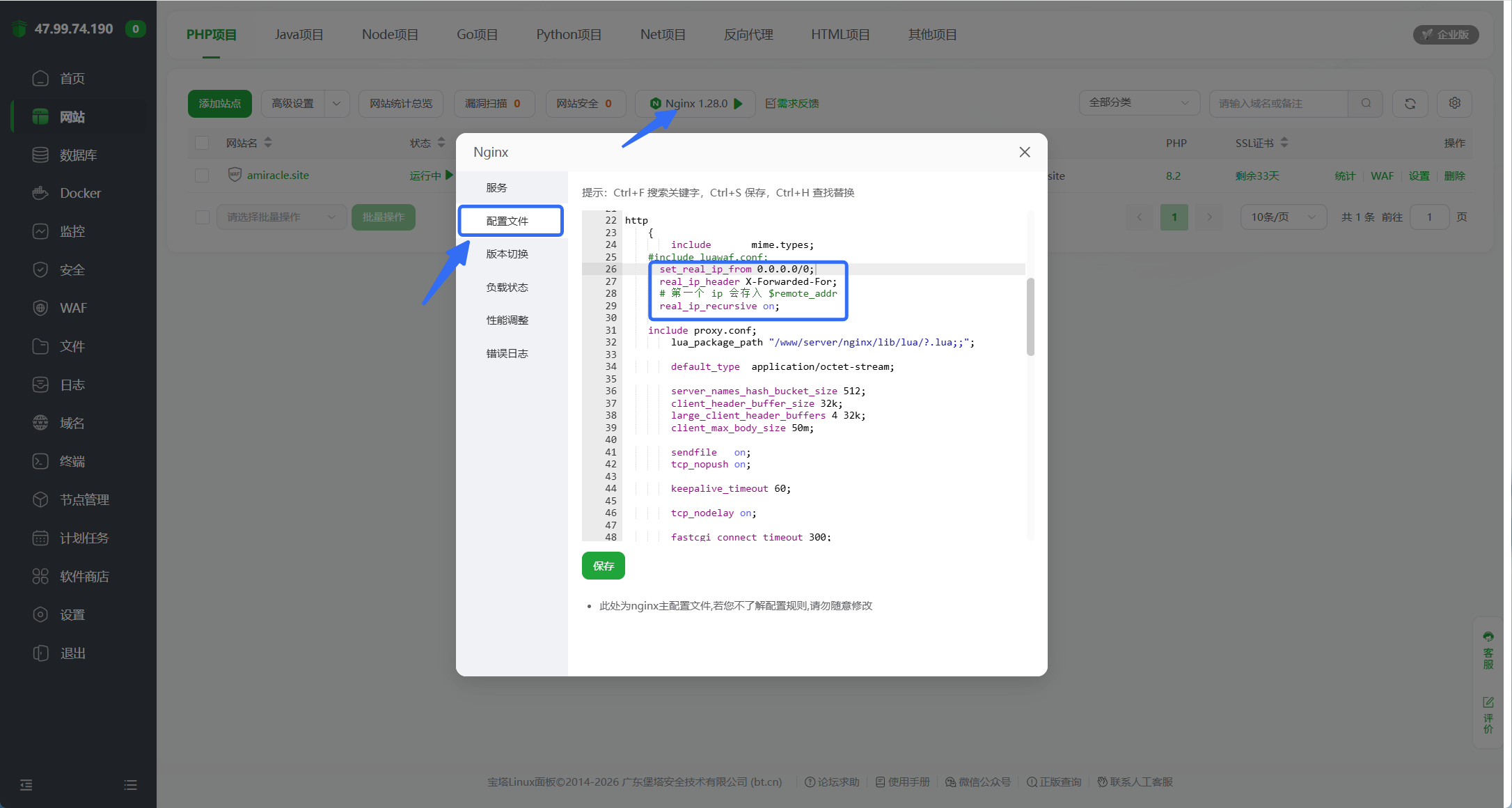
Nginx 配置如下代码
set_real_ip_from 0.0.0.0/0;
real_ip_header X-Forwarded-For;
# 第一个 ip 会存入 $remote_addr
real_ip_recursive on;
下图为宝塔操作步骤,其他应该也类似
在 themes/anzhiyu/source/ 中新建 api/get-ip.php,用来向服务器请求,代码如下
<?php
header('Content-Type: application/json');

// 得到客户端到服务器的第一个 ip
$ip = $_SERVER['REMOTE_ADDR'];

echo json_encode(['ip' => $ip]);
之后在 themes/anzhiyu/source/js/ 中新建 card_visitor.js,代码如下
async function fetchIP() {
    try {
        const res = await fetch('/api/get-ip.php');
        const data = await res.json();
        const ip = data.ip;
        // if(!ip) throw new Error("ip 值为空");
        return ip;
    } catch (e) {
        console.error(e);
        return "遗失在黑洞了owo";
    }
}
function distanceKm(lat1, lng1, lat2, lng2) {
    const R = 6371; // 地球半径 km
    const toRad = x => x * Math.PI / 180;
    const dLat = toRad(lat2 - lat1);
    const dLng = toRad(lng2 - lng1);
    const a = Math.sin(dLat / 2) ** 2 + Math.cos(toRad(lat1)) * Math.cos(toRad(lat2)) * Math.sin(dLng / 2) ** 2;
    const c = 2 * Math.atan2(Math.sqrt(a), Math.sqrt(1 - a));
    return R * c;
}

const card = (() => {
    // 注入 card styles
    function injectStyles() {
        if (document.getElementById('visitor-card-style')) return;

        const style = document.createElement('style');
        style.id = 'visitor-card-style';
        style.textContent = `
            .card-widget.card-visitor {
                padding-left: 1.2rem !important;
                padding-right: 1.2rem !important;
            }
            .card-visitor .item-title {
                color: rgba(31, 126, 209, 1);
                font-size: 1.2rem;
                font-weight: bold;
                font-family: MV Boli, Comic Sans MS;
            }
            .card-visitor .item-content {
                // margin-top: 60px;
                // color: rgba(255, 187, 0, 0.73);
                font-size: 1rem;
                font-family: 楷体;
                font-weight: 600;
                line-height: 1.3;
            }
            .card-visitor .highlight {
                color: rgba(31, 126, 209, 1);
            }
            .card-visitor .address {
            }
            .card-visitor .ip {
                display: inline-block;
                padding-left: 3px;
                padding-right: 3px;
                border-radius: 5px;

                font-size: 0.8rem;
                filter: blur(5px);
                transition: all 0.3s ease;
            }
            .card-visitor .ip:hover {
                filter: blur(0px);
            }
            .card-visitor .name {
                font-family: MV Boli, Comic Sans MS;
            }
        `;
        document.head.appendChild(style);
    }

    // 插入 card 元素
    function injectCard() {
        if (document.querySelector('.card-visitor')) return;

        const precard = document.querySelector('.card-widget.card-info');
        console.log(precard);
        const newcard = document.createElement('div');
        newcard.className = 'card-widget card-visitor';

        (async () => {
            const ip = await fetchIP();
            const Alat = 30.31974, Alng = 120.1421; // Amir's location
            const key = '2V6BZ-7QW6W-S32RZ-YTTFW-3LLKF-K3BVC'
            const url = `https://apis.map.qq.com/ws/location/v1/ip?ip=${ip}&key=${key}&output=jsonp&callback=fetchData`;
            // JSONP
            window.fetchData = function (data) {
                const { nation, province, city, district } = data.result.ad_info;
                const { lat, lng } = data.result.location;
                let site = `${nation} ${province} ${city}`;
                if (district) {
                    site += ` ${district}`;
                    console.error("进入");
                }
                newcard.innerHTML = `
                    <div class="item-title">Hello There!</div>
                    <div class="item-content">
                        欢迎来自<span class="address highlight">${site}</span>的小伙伴,ip已捕获喵~<br>
                        你的ip是:
                        <span class="ip highlight">
                            ${ip}
                        </span><br>
                        你现在距离 <span class="name highlight">Amir</span> 约有 <span class="highlight">${distanceKm(Alat, Alng, lat, lng).toPrecision(1)}</span> 公里,<span class="highlight">新年快乐,奇迹将至喵~</span>
                    </div>
                `;
                precard.insertAdjacentElement('afterend', newcard);
            };
            (function () {
                const script = document.createElement('script');
                script.src = url;
                document.body.appendChild(script);
            })();
        })();
    }

    function init() {
        injectStyles();
        injectCard();
    }

    // 暴露 init
    return { init };
})();

document.addEventListener('DOMContentLoaded', () => card.init());
document.addEventListener('pjax:complete', () => card.init());
之后在 themes/anzhiyu/_config.yml 中找到 inject,在 bottom 中添加
- <script src="/js/card_visitor.js"></script>参考文章
调整首页卡片样式
themes/anzhiyu/source/css/ 目录下新建 custom.css,将下面的代码加入即可
#recent-posts .recent-post-info {
    height: 130px !important;
}
#recent-posts .article-meta-wrap {
    top: 102px !important;
}