为文章封面添加加载动画
把白板换成了一个可爱的加载动画,如下图
难点在我终于找到监测 pjax 换页的方法,使用
history.pushState 就可以
在 themes/anzhiyu/source/js 里新建
cover_loading.js,加入下面代码
1
2
3
4
5
6
7
8
9
10
11
12
13
14
15
16
17
18
19
20
21
22
23
|
(function() {
const _pushState = history.pushState;
history.pushState = function(...args) {
_pushState.apply(this, args);
window.dispatchEvent(new Event('urlchange'));
};
})();
const loadingImg = 'https://cdn.amiracle.site/loading.gif';
function setloadingImg() {
const covers = document.querySelectorAll('.post_cover');
covers.forEach(cover => {
const img = cover.querySelector('img.post_bg');
img.src = loadingImg;
});
}
setloadingImg();
window.addEventListener('urlchange', () => {
setloadingImg();
});
|
之后在 themes/anzhiyu/_config.yml 中找到
inject,在 bottom 中添加
1
| - <script src="/js/cover_loading.js"></script>
|
雪花效果
冬天已至,看到群 u 的点子非常之好,添加了一个雪花效果,如图
在 themes/anzhiyu/source/css/ 目录下新建
custom.css,将下面的代码加入
1
2
3
4
5
6
7
8
9
10
11
12
13
14
15
16
17
18
19
20
21
22
23
24
25
26
27
28
29
30
31
32
33
34
35
36
37
38
|
.snowflake-container {
position: fixed;
width: 15px;
height: 15px;
top: -15px;
left: 50%;
z-index: 15;
pointer-events: none;
animation: fall 13s linear forwards;
}
.snowflake {
width: 100%;
height: 100%;
background-image: url('https://cdn.amiracle.site/Snow-Flake-PNG.png');
background-size: cover;
opacity: 0.8;
animation: rotate 10s linear infinite;
}
@keyframes fall {
0% {
transform: translateY(0);
}
100% {
transform: translateY(110vh);
}
}
@keyframes rotate {
0% {
transform: rotate(0deg);
}
100% {
transform: rotate(360deg);
}
}
|
之后在 themes/anzhiyu/_config.yml 中找到
inject,在 bottom 中添加
1
| - <script src="/js/snowflake.js"></script>
|
一图流
在 themes/anzhiyu/source/css/ 目录下新建
custom.css,将下面的代码加入即可
1
2
3
4
5
6
7
8
9
10
11
12
13
14
15
16
17
18
19
20
21
22
23
24
25
26
27
28
29
30
31
| body[data-type="anzhiyu"] #web_bg {
--anzhiyu-background: url('https://cdn.amiracle.site/%E6%9B%B8%E7%94%9F.jpg');
filter: blur(0.5px) brightness(0.75);
}
@media (max-width: 768px) {
body[data-type="anzhiyu"] #web_bg {
--anzhiyu-background: url('https://cdn.amiracle.site/sharkGura.jpg');
filter: blur(0.3px) brightness(1);
top: -12.5%;
left: -12%;
width: 125%;
height: 125%;
}
}
body[data-type="anzhiyu"] #page-header {
background: transparent !important;
}
body[data-type="anzhiyu"] #footer {
background: transparent !important;
}
body[data-type="anzhiyu"] #footer-bar{
background: transparent !important;
}
body[data-type="anzhiyu"] {
--anzhiyu-card-bg: rgba(255, 255, 255, 0.93);
}
|
之后在 themes/anzhiyu/_config.yml 中找到
inject,在 head 中添加
1
| - <link rel="stylesheet" href="/css/custom.css" media="defer" onload="this.media='all'">
|
参考文章
添加来访者卡片
直接使用 api 的话,很多时候得到的是代理地址。要得到用户的真实
ip,可以向服务器请求,追溯用户的第一个
ip,这个大概率是真实的。之后使用腾讯地图
api,就可以得到大致地理位置了。
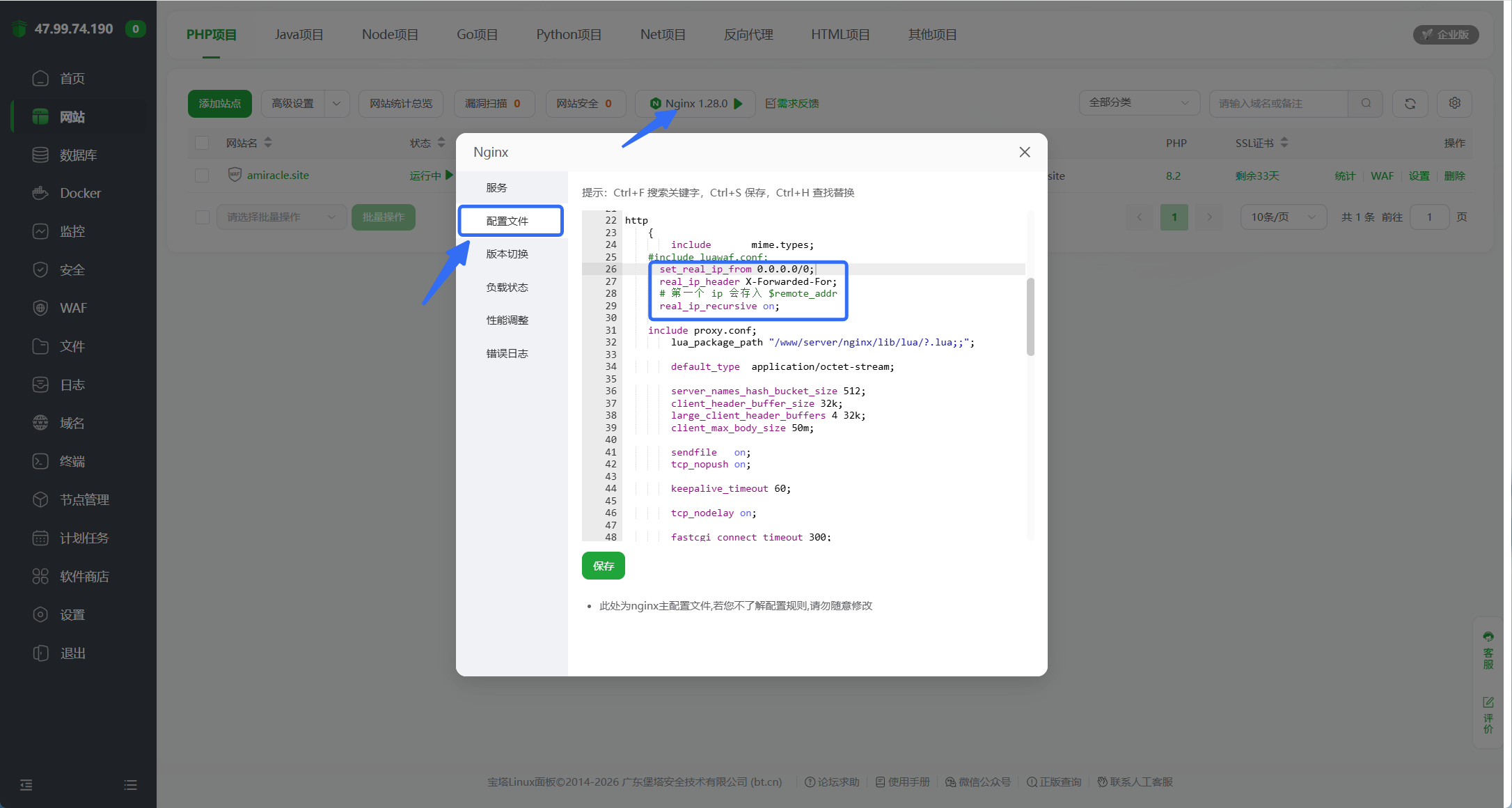
Nginx 配置如下代码
1
2
3
4
| set_real_ip_from 0.0.0.0/0;
real_ip_header X-Forwarded-For;
# 第一个 ip 会存入 $remote_addr
real_ip_recursive on;
|
下图为宝塔操作步骤,其他应该也类似
在 themes/anzhiyu/source/ 中新建
api/get-ip.php,用来向服务器请求,代码如下
1
2
3
4
5
6
7
| <?php
header('Content-Type: application/json');
$ip = $_SERVER['REMOTE_ADDR'];
echo json_encode(['ip' => $ip]);
|
之后在 themes/anzhiyu/source/js/ 中新建
card_visitor.js,代码如下
1
2
3
4
5
6
7
8
9
10
11
12
13
14
15
16
17
18
19
20
21
22
23
24
25
26
27
28
29
30
31
32
33
34
35
36
37
38
39
40
41
42
43
44
45
46
47
48
49
50
51
52
53
54
55
56
57
58
59
60
61
62
63
64
65
66
67
68
69
70
71
72
73
74
75
76
77
78
79
80
81
82
83
84
85
86
87
88
89
90
91
92
93
94
95
96
97
98
99
100
101
102
103
104
105
106
107
108
109
110
111
112
113
114
115
116
117
118
119
120
121
122
123
124
125
126
127
128
| async function fetchIP() {
try {
const res = await fetch('/api/get-ip.php');
const data = await res.json();
const ip = data.ip;
return ip;
} catch (e) {
console.error(e);
return "遗失在黑洞了owo";
}
}
function distanceKm(lat1, lng1, lat2, lng2) {
const R = 6371;
const toRad = x => x * Math.PI / 180;
const dLat = toRad(lat2 - lat1);
const dLng = toRad(lng2 - lng1);
const a = Math.sin(dLat / 2) ** 2 + Math.cos(toRad(lat1)) * Math.cos(toRad(lat2)) * Math.sin(dLng / 2) ** 2;
const c = 2 * Math.atan2(Math.sqrt(a), Math.sqrt(1 - a));
return R * c;
}
const card = (() => {
function injectStyles() {
if (document.getElementById('visitor-card-style')) return;
const style = document.createElement('style');
style.id = 'visitor-card-style';
style.textContent = `
.card-widget.card-visitor {
padding-left: 1.2rem !important;
padding-right: 1.2rem !important;
}
.card-visitor .item-title {
color: rgba(31, 126, 209, 1);
font-size: 1.2rem;
font-weight: bold;
font-family: MV Boli, Comic Sans MS;
}
.card-visitor .item-content {
// margin-top: 60px;
// color: rgba(255, 187, 0, 0.73);
font-size: 1rem;
font-family: 楷体;
font-weight: 600;
line-height: 1.3;
}
.card-visitor .highlight {
color: rgba(31, 126, 209, 1);
}
.card-visitor .address {
}
.card-visitor .ip {
display: inline-block;
padding-left: 3px;
padding-right: 3px;
border-radius: 5px;
font-size: 0.8rem;
filter: blur(5px);
transition: all 0.3s ease;
}
.card-visitor .ip:hover {
filter: blur(0px);
}
.card-visitor .name {
font-family: MV Boli, Comic Sans MS;
}
`;
document.head.appendChild(style);
}
function injectCard() {
if (document.querySelector('.card-visitor')) return;
const precard = document.querySelector('.card-widget.card-info');
console.log(precard);
const newcard = document.createElement('div');
newcard.className = 'card-widget card-visitor';
(async () => {
const ip = await fetchIP();
const Alat = 30.31974, Alng = 120.1421;
const key = '2V6BZ-7QW6W-S32RZ-YTTFW-3LLKF-K3BVC'
const url = `https://apis.map.qq.com/ws/location/v1/ip?ip=${ip}&key=${key}&output=jsonp&callback=fetchData`;
window.fetchData = function (data) {
const { nation, province, city, district } = data.result.ad_info;
const { lat, lng } = data.result.location;
let site = `${nation} ${province} ${city}`;
if (district) {
site += ` ${district}`;
console.error("进入");
}
newcard.innerHTML = `
<div class="item-title">Hello There!</div>
<div class="item-content">
欢迎来自<span class="address highlight">${site}</span>的小伙伴,ip已捕获喵~<br>
你的ip是:
<span class="ip highlight">
${ip}
</span><br>
你现在距离 <span class="name highlight">Amir</span> 约有 <span class="highlight">${distanceKm(Alat, Alng, lat, lng).toPrecision(1)}</span> 公里,<span class="highlight">新年快乐,奇迹将至喵~</span>
</div>
`;
precard.insertAdjacentElement('afterend', newcard);
};
(function () {
const script = document.createElement('script');
script.src = url;
document.body.appendChild(script);
})();
})();
}
function init() {
injectStyles();
injectCard();
}
return { init };
})();
document.addEventListener('DOMContentLoaded', () => card.init());
document.addEventListener('pjax:complete', () => card.init());
|
之后在 themes/anzhiyu/_config.yml 中找到
inject,在 bottom 中添加
1
| - <script src="/js/card_visitor.js"></script>
|
参考文章
调整首页卡片样式
themes/anzhiyu/source/css/ 目录下新建
custom.css,将下面的代码加入即可
1
2
3
4
5
6
| #recent-posts .recent-post-info {
height: 130px !important;
}
#recent-posts .article-meta-wrap {
top: 102px !important;
}
|